Plugins
Plugins can extend the functionality of AvNav. Typical plugin applications are:
- Adding new displays (widgets)
- Adding layouts
- New icons, colors, button text
- Fonts
- New chart formats
- New chart sources or charts
- History functions
- ...
AvNav provides various interfaces through which plugins can contribute extensions:
- Extensions for the display part using JavaScript code or CSS
- User apps, i.e., custom GUIs that are embedded in AvNav
- Extensions for the server part (only Windows/Linux/Raspberry - not Android).
Installation of plugins
There are two ways to install plugins:
-
As Debian packages
On Linux and Raspbian, plugins can be delivered as Debian packages. These install their contents to
/usr/lib/avnav/plugins/*plugin-name*.In AvNav, these plugins are visible with the prefix
system-. -
As a zip file
For this, the ZIP file must contain exactly one folder with the name of the plugin. Code and data must be located below this folder. Such a zip file can then be installed in AvNav via
->=>
They are installed in the AvNav data directory under
plugins.These plugins are visible with the prefix
user-.
In addition, there are some plugins that are delivered directly with AvNav. These are visible with the prefix builtin-.
On the plugin page ->, you can get a list of currently installed plugins.
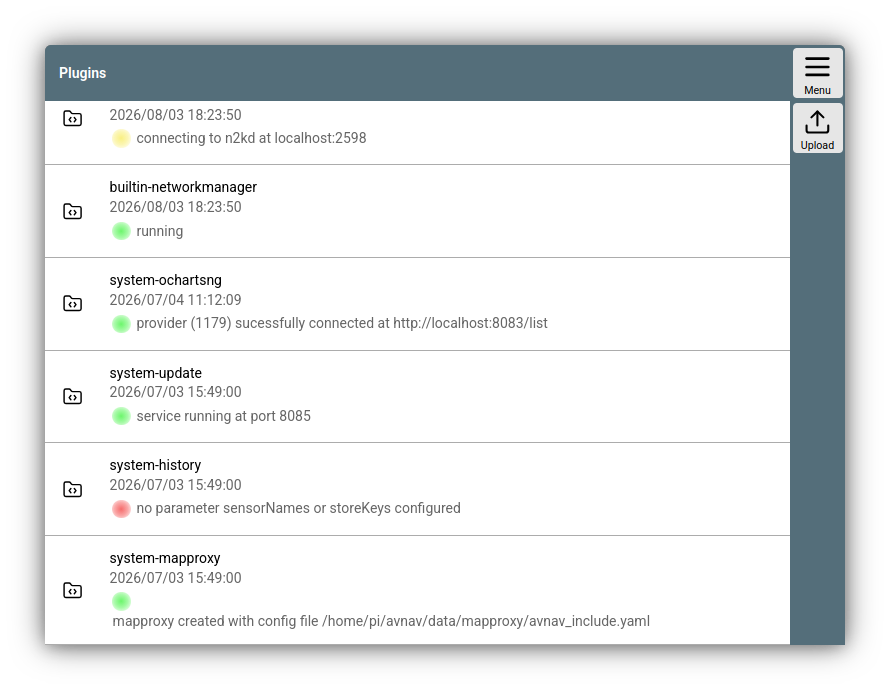
Plugin list
Clicking on an entry opens a dialog.
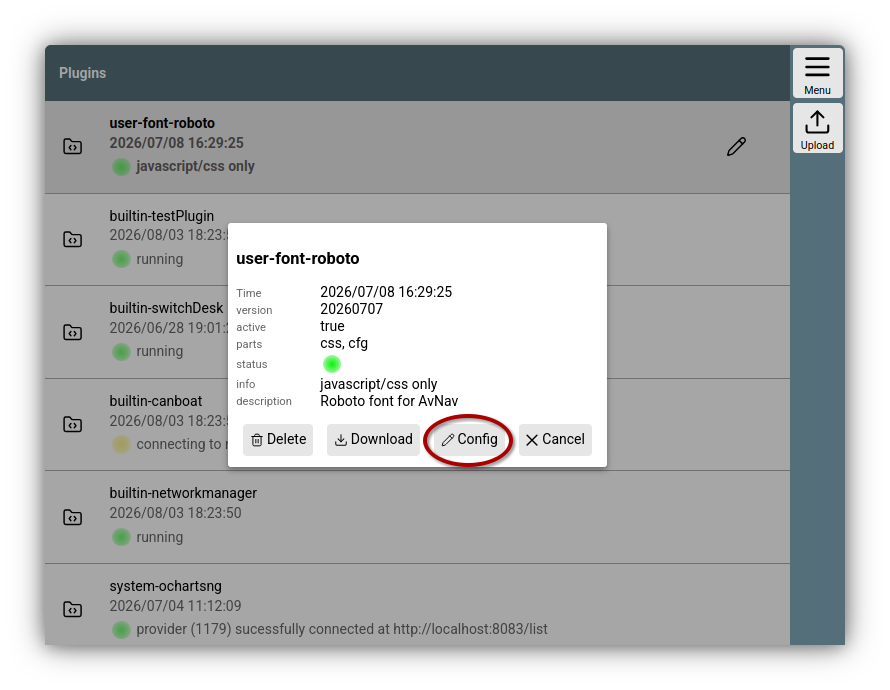
Plugin dialog
If it is a user- plugin like in the example, you can delete it via the dialog or download it as a zip file. If the plugin includes a UserApp, you can access it directly from here via the button .
Via , you can change parameters for the plugin - or deactivate it if necessary.
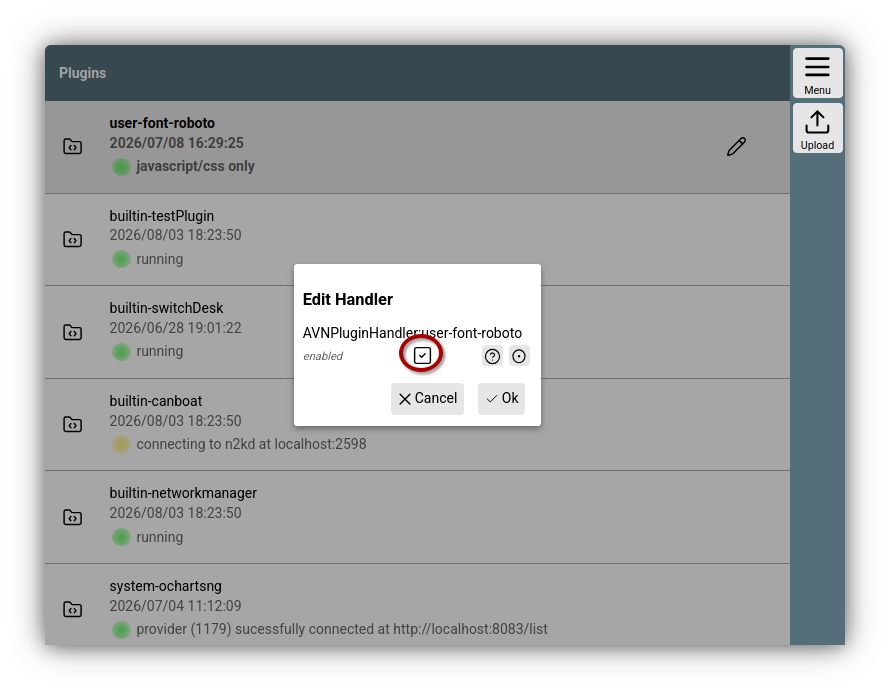
Plugin configuration
List of plugins
A list of plugins can be found here.
Creating plugins
Plugins are zip files or Debian packages containing various components. Each plugin is installed into a directory on the AvNav server. The exact structure of the zip file or the Debian package is described under Build.
The components described here must be located in the base directory of the plugin.
JavaScript code
All platforms
The JavaScript code of the plugin must be located in the file plugin.mjs. This file is loaded as a JavaScript module . The code is only loaded if the plugin has not been deactivated. After an update, the code is automatically reloaded. For the plugin JavaScript code, the same interfaces and functions are available as for the user JavaScript code.
Compatibility with previous versions - plugin.js
In earlier versions, the JavaScript code was located in a file plugin.js. This was a simple JavaScript file, not a module. The current version still supports a plugin.js file. Since this file is also loaded via a JavaScript module in the current version and modules require stricter JavaScript code, errors may occur when loading the file. In that case, you may need to adapt your code. If both files are present, only the plugin.mjs is loaded.
If you want to make your module compatible with older AvNav versions (before 202607xx), you can place the entire code in the plugin.mjs file and additionally add a file plugin.js with the following content:
However, you must always test in the code whether any new API functions are already available.CSS
All platforms
In a file plugin.css, a plugin can provide CSS to customize the appearance of AvNav. The same functions are available as for user CSS.
As a plugin developer, you should keep in mind that the CSS code becomes effective immediately once the plugin is loaded. If you, for example, only want to introduce additional displays (widgets), you should design the CSS code so that it only affects these own widgets - not the other displays in AvNav.
plugin.json
All platforms
A plugin can include a file plugin.json. This must contain a JSON object with various keys.
| Key | Type | Description |
|---|---|---|
| version | String | The plugin version |
| description | String | A short description of the plugin (max. 80 characters) |
| charts | Array | A description of charts that the plugin brings with it. |
| userApps | Array | A list of user apps - see below |
| layouts | Array | A list of objects describing layouts. Each element must contain the keys name for the layout name and file for a relative filename to the layout JSON file |
UserApps
The entries for the userApps parameter must contain the following values:
| Name | Type | Description |
|---|---|---|
| url | String, required | The URL for the user app. Can be a relative path to an HTML file in the plugin |
| iconFile | String | Relative path to an icon file. Alternatively via CSS. |
| shortText | String | Short text for the button. Alternatively via CSS |
| longText | String | Long text for the button. Alternatively via CSS |
| title | String | Title for the display. If not set, no title line is shown |
| page | String | The AvNav page on which the button for the user app should be displayed. |
| name | String | The name for the button. Also used for the CSS class. The final CSS name is formed from prefix-pluginname-name, i.e., for a zip plugin with the name "test" and the name "ui": user-test-ui. |
Python code
Only on Windows/Linux/Raspberry. Not on Android.
To extend server functions, plugins can also contain Python code. The starting point is a file plugin.py.
AvNav offers a range of interfaces for the Python code.
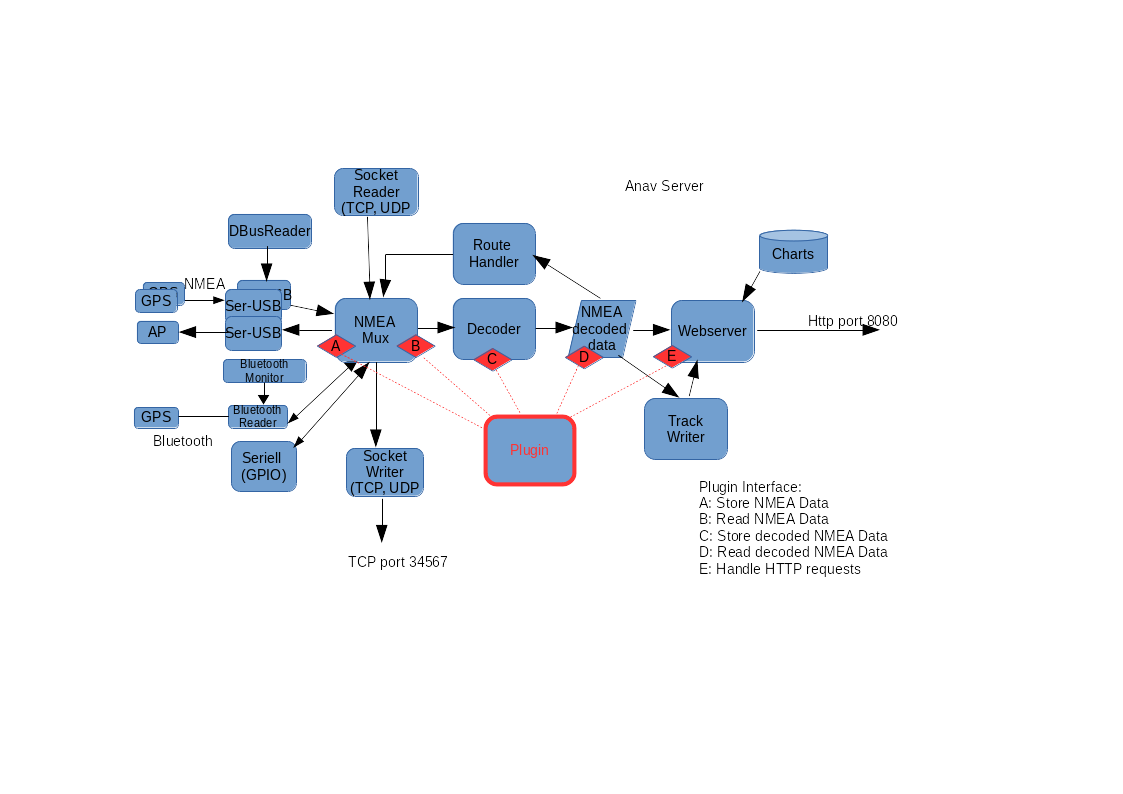
The drawing provides a rough overview of the internal structure of the AvNav server and the points where a plugin can read out or feed in data.
| Point | Function | Example |
|---|---|---|
| A | Feeding NMEA data into the internal list. These are then available at all outputs. Note: Such data is not initially available for the WebApp as long as there is no decoder for this data record. | Reading out a sensor and generating the appropriate NMEA0183 data record. |
| B | Reading out received NMEA data. Here, (possibly with a filter) all NMEA data passing through AvNav can be read. | In interaction with point "C", decoding of NMEA data records |
| C | Feeding data into the internal memory of AvNav. The data in the internal memory is stored in a tree structure. Each element is addressed by a key in the form "a.b.c....". Example: "gps.lat". All key values starting with "gps." are automatically transferred to the WebApp and are then available there under "nav.gps...." (see Layout Editor and user-specific Java Script). Key values must be registered by the plugin beforehand; it is not possible to overwrite keys already used in the system. Exception: The user configures the value "allowKeyOverride" to true for the plugin. | Feeding in a value read from a sensor - e.g., gps.temperature.outside or from decoded NMEA data. |
| D | Reading data from the internal memory. | Calculation of new data and feeding in under "C" - or passing on to an external connection. |
| E | Handling HTTP requests | The JavaScript parts can send an HTTP request that can be processed in the Python code. Responses typically in JSON |
An example of a plugin.py can be found on GitHub.
For the plugin to be recognized by AvNav, the following prerequisites must be met:
- In plugin.py, there must be at least one class present; the name should be "Plugin"
- The class must have a static method (@classmethod) with the name
"pluginInfo" that returns a dictionary.
# description (mandatory) # data: list of keys to be stored (optional) # path - the key - see AVNApi.addData, all pathes starting with "gps." will be sent to the GUI # description @classmethod def pluginInfo(cls): return { 'description': 'a test plugins', 'data': [ { 'path': 'gps.test', 'description': 'output of testdecoder', } ] } - The constructor of the plugin class must expect a parameter.
Upon call, an instance of the API is passed here, through which communication with AvNav takes place. - The class must have a run method (without parameters).
This is called in its own thread after initialization is complete.
Typically, this method will contain an infinite loop to realize the plugin function.
Plugin API
At the API, the following functions are available
| Function | Description |
|---|---|
| log,debug,error | Logging functions. Lines are written to the AvNav log file. For log and error, one should avoid writing such entries in large numbers, as otherwise potentially important information is lost in the log (e.g., not an error entry every second...) |
| getConfigValue | Reads a config value from the avnav_server.xml. |
| fetchFromQueue | Interface B: reads data from the internal NMEA list. An example is available in the API code. The filter parameter works like in the avnav_server.xml. |
| addNMEA | Interface A: writes an NMEA data record into the internal list. One can leave the checksum calculation to AvNav and can also prevent a decoding in AvNav. The source parameter is a value that can be used in blackList parameters. |
| addData | Interface C: writes a value to the internal memory. Only values whose keys were present in the return of the pluginInfo method can be written. |
| getSingleValue | Interface D: reads a data value from the internal memory. To summarize several such read operations, the function getDataByPrefix exists |
| setStatus | Here, the current status of the plugin should be set. This is the value displayed on the plugin page ->. |
| registerUserApp | A plugin can register a User App. Required for this is a URL and an icon file. The icon file should be located in the plugin directory. In the URL, $HOST can be used, which is then replaced by the correct IP address of the AvNav server. |
| registerLayout | If the plugin brings its own widgets, for example, it is sometimes helpful to provide a prepared layout that the user can then select. To do this, download the layout after creation with the Layout Editor and save it in the plugin directory. |
| registerSettingsFile (since 20220225) | Registration of a custom settings file, which can be exported beforehand from the settings page. The filename (second parameter) is relative to the plugin directory. The name (first parameter) is displayed to the user. In this file, you can use $prefix$ in the layout name if the layout is registered in the same plugin. "layoutName": "$prefix$.main" |
| getDataDir | The directory where AvNav stores data |
| registerChartProvider | If the plugin provides charts, a callback is registered here that returns a list of the charts. |
| registerRequestHandler | If the plugin is to process HTTP requests (Interface E), a callback must be registered here that handles the request. The URL for the call is: api.getBaseUrl()+"/api". In the simplest case, the called callback function can return a dictionary, which is sent back as JSON. |
| getBaseUrl | Return the base URL for the plugin |
| registerUsbHandler (from 20201227) | Registers a callback for a USB device. With this registration, AvNav is informed not to pay attention to the USB device. The callback is called with the device path for the device when the device is detected. The USB ID can most easily be determined by observing the status page when plugging in the device. See also AVNUsbSerialReader. This allows a plugin to easily handle a specific device itself. An example can be found on GitHub. |
| getAvNavVersion (from 20210115) | Current AvNav version (int) |
| saveConfigValues (from 20210322) | Save config values for the plugin in avnav_server.xml. The parameter must be a dictionary with the values. The plugin must ensure that it can restart with these values later. |
| registerEditableParameters (from 20210322) | Registers a list of config values that can be changed at runtime. The first parameter is a list of dictionaries with the parameter descriptions, the second is a callback that is called with the changed values upon changes (will typically call saveConfigValues). The syntax for the parameter list is described in the source code. |
| registerRestart (from 20210322) | Registers a stop callback. This allows the plugin to be disabled. |
| unregisterUserApp (from 20210322) | Deregisters a user app. |
| deregisterUsbHandler (from 20210322) | Deregisters a USB device ID (see registerUsbHandler) |
| shouldStopMainThread (from 20210322) | Can be used in the main loop to check if the plugin should be stopped. In any other thread, true is always returned. |
| sendRemoteCommand (from 20230426) | Sends a remote control command, see the source code for details. |
| registerSettingsFile (from 20230426) | Makes a file with saved settings known. This can then be loaded by the user. |
| registerCommand (from 20230426) | Registers a command that can be executed by AvNav. This can, for example, be used to replace an existing command. New commands are also possible. See the source code or the AVNCommandHandler configuration for details. |
| registerConverter (since 20240520) | Registers a chart converter. For an example, see the O-ChartsNG plugin |
| deregisterConverter (since 20240520) | Deregisters a chart converter |
| clearAlarms (20250723) | Clears all alarms |
| startAlarm (202607xx) | Creates an alarm |
| clearAlarm (202607xx) | Clears an alarm |
| getRunningAlarms (202607xx) | List of all active alarms |
Build
Zip file
To make a plugin available for use by other AvNav users, it is preferably provided as a zip file. Plugins as zip files can be used on all platforms supported by AvNav. If they are also intended for Android, they should not contain Python code, as this is not used there.
Such a zip file for an example plugin with the name doctest has, for example, the following content
d doctest
f doctest/plugin.json
f doctest/plugin.mjs
f doctest/plugin.css
d doctest/images
f doctest/images/icon.svg
user-doctest in AvNav.
This zip file can be created with any zip tool. It is important that the name of the directory inside the zip file always remains the same for new versions. The name of the zip file does not matter to AvNav - however, it should contain the plugin and a version to simplify use by the user.
Preferably, one should maintain the plugin on a git platform (e.g., GitHub) and provide the zip file in every release. You should set the value for version in the plugin.json each time.
If you want to build the plugin on Linux, there is an example here of a simple build script to create the zip file.
Debian packages
If a plugin is only intended to run on Linux/Raspberry, it can also be delivered as a Debian package. You can use the Debian package tools directly for this. If that is too complicated, you can use NFPM or the Gradle OsPackage plugin. For NFPM, there is a docker container, so creating the build is very simple. An example can be found in the avnav-update-plugin.
The package must be built so that all data belonging to the plugin is unpacked under /usr/lib/avnav/plugins/plugin-name.
Plugins delivered as Debian packages require a restart of AvNav after installation.
Activating and hiding system plugins
To make plugins that were installed with Debian packages "invisible", there is a script /usr/lib/avnav/plugin.sh. As root, you can call this script to control the visibility of system plugins and set default parameters.
A call without parameters generates a help text with the call options.
Special functions for the Raspberry Pi
Plugins created as Debian packages for the Raspberry Pi (system plugins) can provide a shell script "plugin-startup.sh". This script enables plugins to configure system parameters. It is always called during the system's boot process. Whether and with which parameters such a script is called depends on a parameter in the file /boot/firmware/avnav.conf (see Image preparation).
The parameter name is:
AVNAV_<PLUGIN>
Where
There are 3 call variants:
plugin-startup.sh enable
This call takes place at the first boot with the parameter in the avnav.conf set to "yes". The plugin should now make all necessary changes to the system. If possible, in such a way that changes can be undone later. Typically, this concerns adjustments in the file /boot/firmware/config.txt or other configuration files. The script should return "1" if a reboot is necessary, otherwise "0" or "< 0" for errors.
There are some helper functions that can be used in the script. These helper functions are included in the script with
The environment variableAVNAV_SETUP_HELPER is set when the script is called.
An example can be found in the obp-plotterv3-plugin.
plugin-startup.sh disable
This call is executed when the parameter in the avnav.conf is changed from yes to another value or removed. The script should revert the changes made to the system - as far as possible.
Note: Since the handling is normally only intended to take place once during the first use of an image, it is not a major problem if changes are not reverted.
plugin.startup.sh [no parameters]
This call occurs at every boot process. In this case, no settings should be changed in the system - it could otherwise be very surprising for the user if system settings were suddenly changed during an arbitrary startup process. However, necessary initializations of hardware, for example, can be carried out.